Webhooks
Strise can send events to an HTTPS endpoint you control. When something significant happens to your portfolio — a review finishes, a customer-facing form changes status — Strise pushes a signed HTTP request to your server in near real time, so your systems can react without polling.
Where to configure
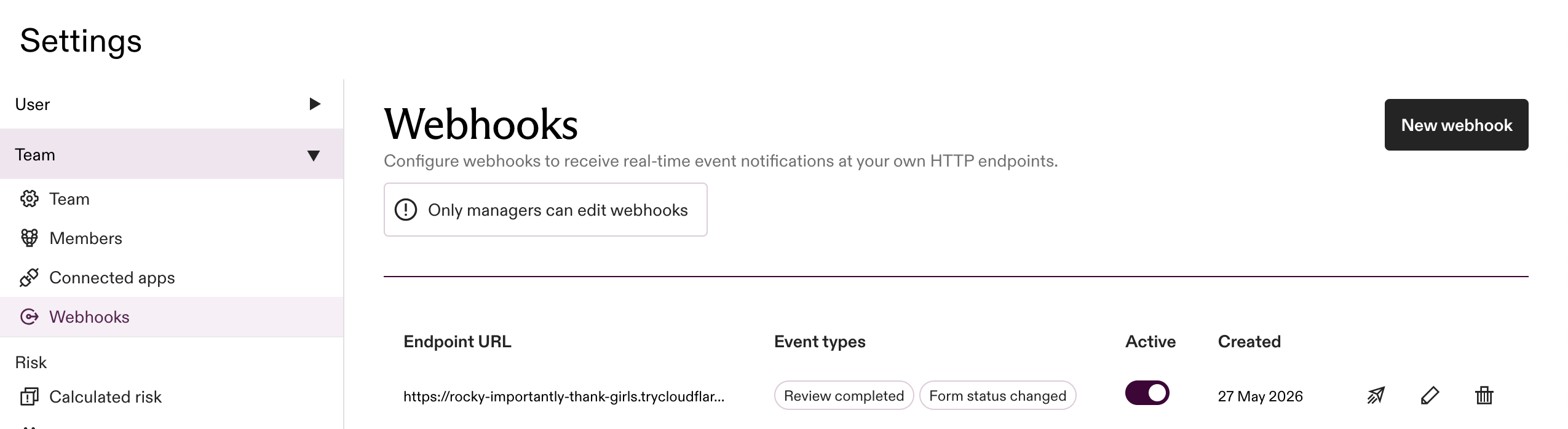
Manage subscriptions under Settings → Team → Webhooks. Only team managers can create or edit them. Each subscription has an endpoint URL, the set of event types you want, and an active toggle.
Supported events
| Event type | When it fires |
|---|---|
review.completed | A review has finished processing and its result is ready. Payload includes the review id and the entity it was run on. |
form.status.changed | A customer-facing form has changed status (e.g. PENDING → IN_PROGRESS → SUCCESS). Payload includes the form instance id, the entity, and the old and new statuses. Status values match the DocumentStatus GraphQL enum. |
More events will be added over time. Contact Strise if there’s one you’d like to see.
newStatus on form.status.changed can also be INCONCLUSIVE — the form was completed, but the document-verification step could not be conclusively resolved.
Send a test event
Once a subscription is active, you can trigger a real delivery on demand to check your endpoint — no need to wait for a live review to finish or a form to change status. Under Settings → Team → Webhooks, use the subscription’s Send mock event action, pick one of the event types it’s subscribed to, review the JSON payload, and send.
Strise publishes the test event through the same pipeline as a production delivery: the same signed envelope and OIDC token, posted to the endpoint you registered. A test event therefore exercises your signature verification and your handler end to end, against a payload you can see up front. Sending is limited to team managers, and only while the subscription is active.
Same event id on every resend
Re-sending the same mock event produces a delivery with the same id each
time. This is deliberate: it lets you confirm your
deduplication works. A receiver that dedupes on the
event id processes the first delivery and ignores identical resends — so if a
repeated test event stops appearing downstream, your dedup is doing its job.
What you receive
An HTTPS POST to the endpoint you registered, with:
- Header
Authorization: Bearer <JWT>— the token you verify (below). - The event as the raw JSON body. The envelope carries everything you need to identify, route, and dedupe a delivery — no other headers are required for processing.
{
  "id": "4bdf74b2-0d8e-3379-9739-cba7db9b602d",
  "version": "1",
  "eventType": "form.status.changed",
  "teamId": "b07e18b1-45bf-4d5d-877e-ad0374d70111",
  "subscriptionId": "76a48168-145b-495a-8cec-0ee929d8c15c",
  "timestamp": "2026-05-27T12:41:58.985818515",
  "data": {
    "formInstanceId": "…",
    "entityId": "…",
    "entityKind": "Company",
    "oldStatus": "IN_PROGRESS",
    "newStatus": "SUCCESS"
  }
}
Your endpoint must be HTTPS — Strise will not push to plain HTTP, and the payload’s integrity in transit relies on TLS. See Acknowledging the delivery below for how to respond.
Verifying the signature
Every delivery carries an Authorization: Bearer <JWT> header containing a
Google-issued OIDC token, signed on behalf of Strise’s delivery service account.
Verifying it proves the request came from Strise and reached you unaltered.
Verify it before trusting the payload.
What to verify against
| Claim | Expected value |
|---|---|
| signature | Google’s public keys (JWKS): https://www.googleapis.com/oauth2/v3/certs |
iss | https://accounts.google.com |
email | webhook-delivery@strise-prod.iam.gserviceaccount.com |
aud | the exact endpoint URL you registered for the subscription |
exp | must be in the future |
email is a fixed Strise value (above). aud is whatever endpoint URL you entered when you
created the subscription — Strise sets the token’s audience to your push endpoint.
⚠️ The rule that matters most
A valid Google signature alone does not prove the request is from Strise. Anyone with a
Google Cloud account can obtain a Google-signed OIDC token (iss: https://accounts.google.com,
valid signature). What pins a token to Strise is the email claim (the delivery service
account) together with the aud claim (your endpoint).
Always check both email and aud after verifying the signature. Verifying only the
signature or only the issuer leaves you open to spoofing.
Verification steps
- Extract the token from the
Authorization: Bearerheader. - Fetch Google’s public keys (the libraries below cache and rotate them for you).
- Verify the signature and standard claims (
iss,exp). - Assert
audequals your registered endpoint URL. - Assert
emailequalswebhook-delivery@strise-prod.iam.gserviceaccount.com(andemail_verifiedistrue). - Only then trust and process the event JSON in the request body.
Code samples
Each sample verifies the header and returns the claims on success. Replace
EXPECTED_AUDIENCE with the endpoint URL you registered.
Node.js — google-auth-library
import { OAuth2Client } from 'google-auth-library'

const client = new OAuth2Client()
const EXPECTED_EMAIL = 'webhook-delivery@strise-prod.iam.gserviceaccount.com'
const EXPECTED_AUDIENCE = 'https://your-domain.example.com/strise-webhook'

// Throws if the token is missing, invalid, expired, or not issued by Strise.
export async function verifyStriseWebhook(authorizationHeader) {
  if (!authorizationHeader?.startsWith('Bearer ')) throw new Error('missing bearer token')
  const token = authorizationHeader.slice('Bearer '.length)

  // Verifies the Google signature (JWKS), iss, exp, and aud.
  const ticket = await client.verifyIdToken({ idToken: token, audience: EXPECTED_AUDIENCE })
  const claims = ticket.getPayload()
  if (claims.email !== EXPECTED_EMAIL || claims.email_verified !== true) {
    throw new Error('token not issued by Strise')
  }
  return claims
}
Python — google-auth
from google.oauth2 import id_token
from google.auth.transport import requests as google_requests

EXPECTED_EMAIL = "webhook-delivery@strise-prod.iam.gserviceaccount.com"
EXPECTED_AUDIENCE = "https://your-domain.example.com/strise-webhook"

def verify_strise_webhook(authorization_header: str) -> dict:
    if not authorization_header.startswith("Bearer "):
        raise ValueError("missing bearer token")
    token = authorization_header[len("Bearer "):]

    # Verifies the Google signature (JWKS), iss, exp, and aud.
    claims = id_token.verify_oauth2_token(token, google_requests.Request(), audience=EXPECTED_AUDIENCE)
    if claims.get("email") != EXPECTED_EMAIL or not claims.get("email_verified"):
        raise ValueError("token not issued by Strise")
    return claims
Go — google.golang.org/api/idtoken
import (
	"context"
	"fmt"
	"strings"

	"google.golang.org/api/idtoken"
)

const (
	expectedEmail    = "webhook-delivery@strise-prod.iam.gserviceaccount.com"
	expectedAudience = "https://your-domain.example.com/strise-webhook"
)

// VerifyStriseWebhook returns the verified claims, or an error if the token is
// missing, invalid, expired, or not issued by Strise.
func VerifyStriseWebhook(ctx context.Context, authorizationHeader string) (*idtoken.Payload, error) {
	token := strings.TrimPrefix(authorizationHeader, "Bearer ")
	if token == authorizationHeader {
		return nil, fmt.Errorf("missing bearer token")
	}

	// Validate verifies the Google signature (JWKS), iss, exp, and aud.
	payload, err := idtoken.Validate(ctx, token, expectedAudience)
	if err != nil {
		return nil, err
	}
	if payload.Claims["email"] != expectedEmail || payload.Claims["email_verified"] != true {
		return nil, fmt.Errorf("token not issued by Strise")
	}
	return payload, nil
}
Acknowledging the delivery
Respond with any 2xx status code to acknowledge receipt. A non-2xx response (or a timeout)
causes Strise to retry the same payload.
Always acknowledge, even if your own processing fails. If your downstream handler errors
— a database write throws, your queue is full, an exception bubbles up — still respond 2xx
and handle the failure on your side (log, alert, retry from your own queue). A non-2xx tells
Strise the message didn’t reach you, so we keep retrying the identical payload. That rarely
fixes a downstream bug and just amplifies the noise on your end.
Common failure modes
- Verifying the signature but not
email/aud— the signature only proves Google issued the token, not that Strise did. Always check both claims. This is the most common mistake. - Decoding without verifying — base64-decoding the JWT body to read claims, without validating the signature, trusts attacker-supplied data. Use a library that verifies.
- Wrong
aud— the audience must equal the exact endpoint URL you registered (the URL Strise pushes to), not a service name or a different path. - Clock skew —
expis roughly one hour out. If your server’s clock drifts, valid tokens get rejected. Keep it NTP-synced; the libraries above tolerate a few seconds of skew. - Stripped
Authorizationheader — some load balancers and API gateways strip or rewriteAuthorization. Make sure it reaches your application intact. - Key rotation — Google rotates its signing keys periodically. All three libraries fetch and cache the JWKS and follow rotation automatically; never pin a key.
- Replays — a captured token is valid until
exp(~1 hour). Deduplicate on the eventidin the payload (stable across redeliveries) so reprocessing is harmless.